Real-time staff ratios, not calculated after the fact
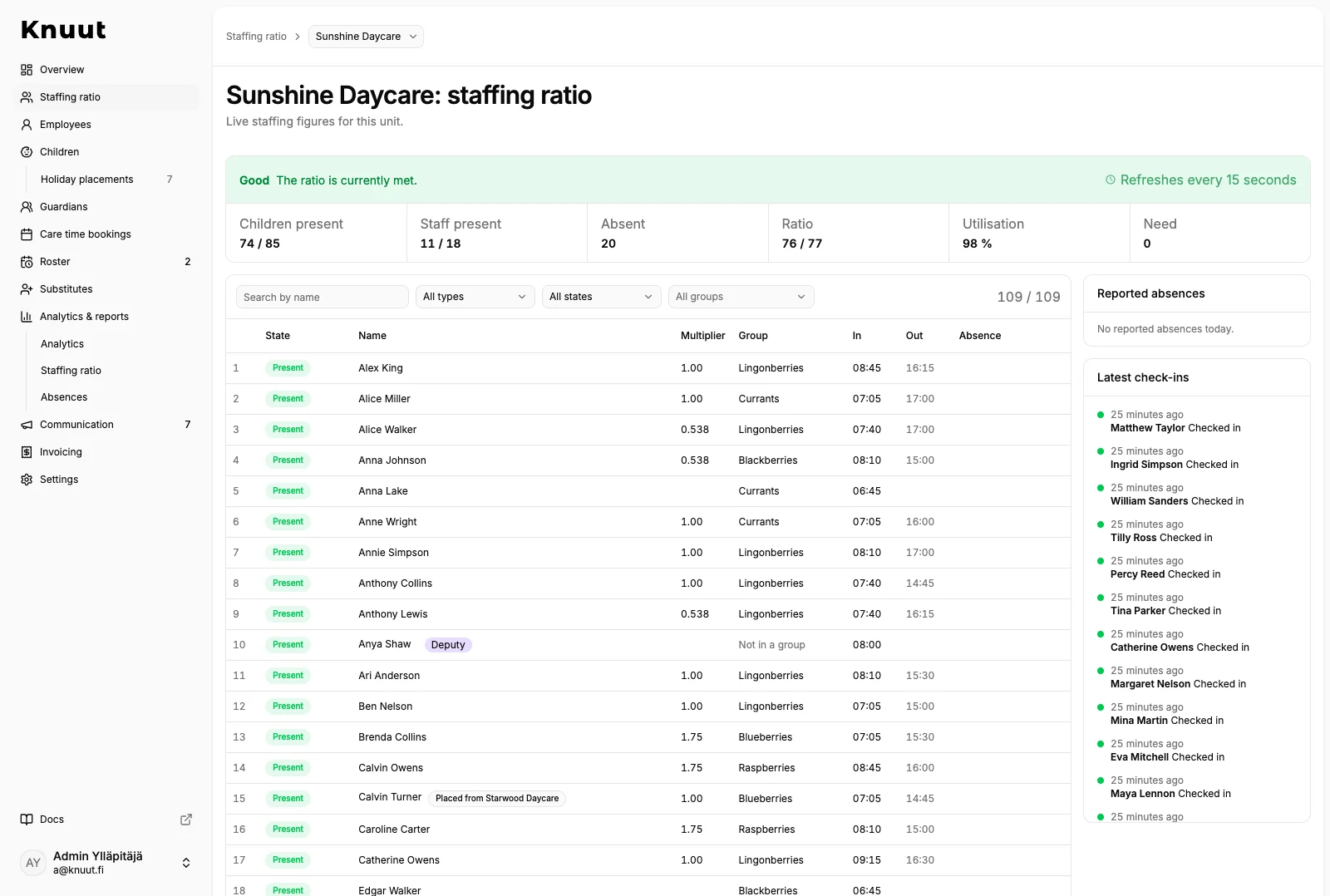
Knuut calculates each unit's staff ratio as children and staff are checked in. Understaffing and overstaffing show up immediately, both in the unit and for the admin team.
How it works
- Knuut Attendance
- Admin web app
- Knuut Management
Calculated from check-ins
The staff ratio is not a separate spreadsheet someone has to keep updated. It comes straight from the children who are checked in and the staff counted towards the ratio. When a check-in changes, the ratio changes.
The whole unit at once
The ratio is calculated for the whole unit: the ratio itself, the utilisation rate and the staffing need. The unit app also shows how many children and adults are present in each group, and the admin view shows every unit at once.
Present but not in the ratio
A staff member can be in the unit without counting towards the ratio. This is marked when they check in, so the numbers match what is really happening.
One view for chain management
In organisations with several units, the staff ratios of every unit sit side by side in one table. The management mobile app shows the same numbers on a phone.
What's included
- Staff ratio per unit
- Understaffing and overstaffing highlighted
- Utilisation rate and staffing need per unit
- Mark a staff member as counted in the ratio or outside it
- The same number on the unit's phone, in the admin browser and on management's phone
Read more
Understaffing gets noticed because the group feels it. Overstaffing is felt nowhere, so it runs for months. How a chain sees every unit's staff ratio side by side.
What Finnish law 540/2018 says about the 1:7, 1:4 and 1:13 ratios, why ratios counted after the fact fall short and what real-time tracking changes day to day.
Related
Guardians report care times and absences on their phone, even on the day itself. The unit knows how many children to expect in advance.
A staff roster built on care times and staff ratios. Working time rules are checked as you plan, and staff see their shifts in the app.
Questions about this feature
How are the ratios set up?
There is nothing to set up. Knuut calculates the ratio for the whole unit from each child's weighting, which follows the ratios set by law, and compares it continuously with the adults who are present.
Can staff see the ratio themselves?
Yes. The unit app shows the ratio for their own unit and the situation in each group, so staff can react before the admin team has time to call.